

Augment your web apps, without touching the backend.
Drop a small agent into any page with a bookmarklet, an extension, or a native integration. It adds a side panel with the actions your team needs.
Live demo, coming soon

An animated walkthrough: an expense report page gains an agentlet side panel that reads a receipt into the form, exports the line items to Excel, and answers a question about the page, all without changing the host page itself.
- Your web app, as it is today.
- Click the agentlet extension.
- A side panel opens. The app itself is unchanged.
- It reads a receipt and fills the form. You review and submit.
- It exports the table to Excel.
- It answers questions about the page.
- Nothing on the host page had to change.
- All of this was built quickly on top of the existing app, with agentlet.
agentlet
noun (software engineering, AI systems)
A lightweight, embeddable software agent injected into an existing application, typically via a browser bookmarklet or extension. It enhances the host application with autonomous or semi-autonomous capabilities such as automation, AI, analytics, or UX augmentation, without requiring backend changes.
See it in action
The same business application, before and after being augmented with an agentlet.
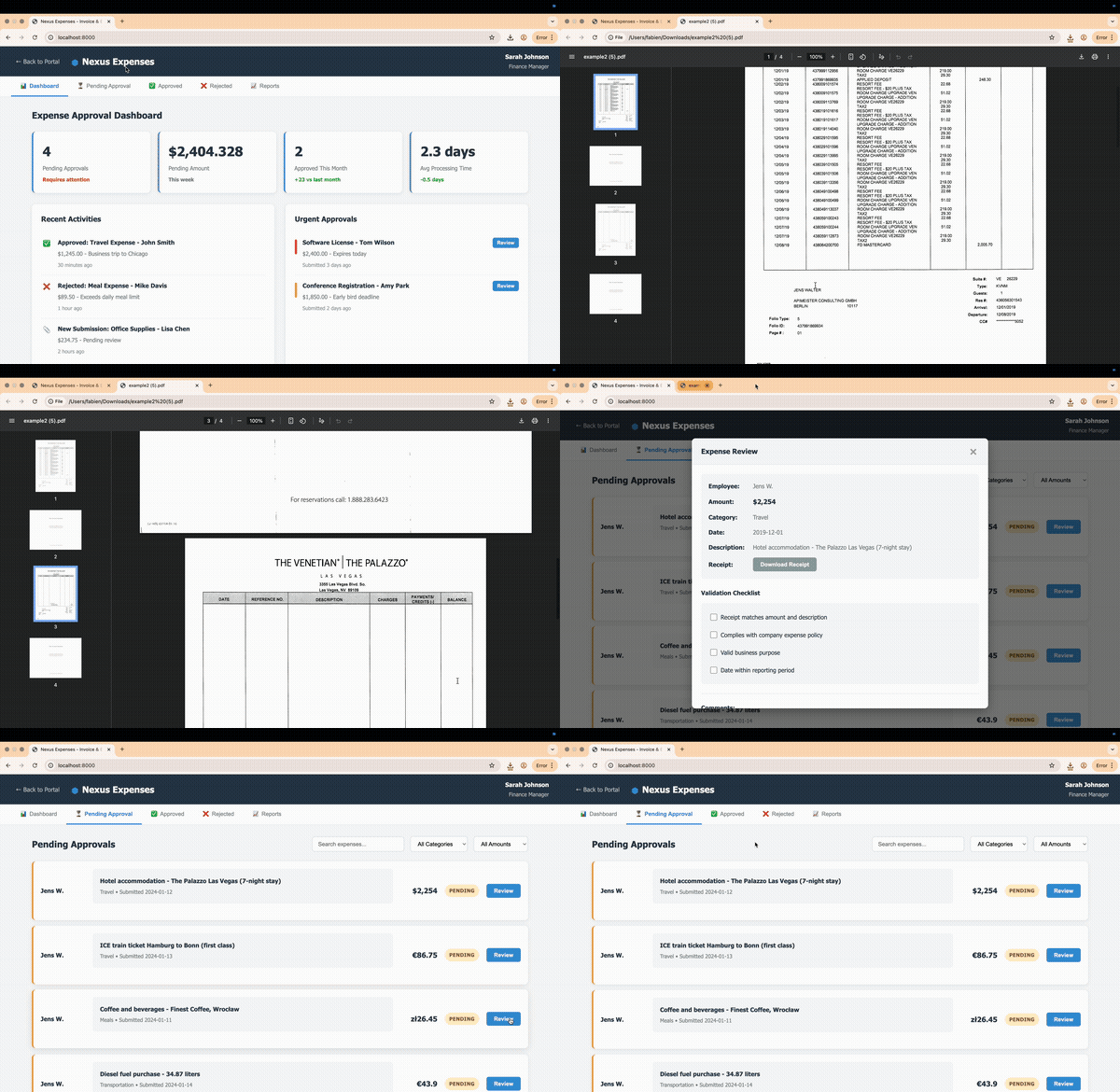
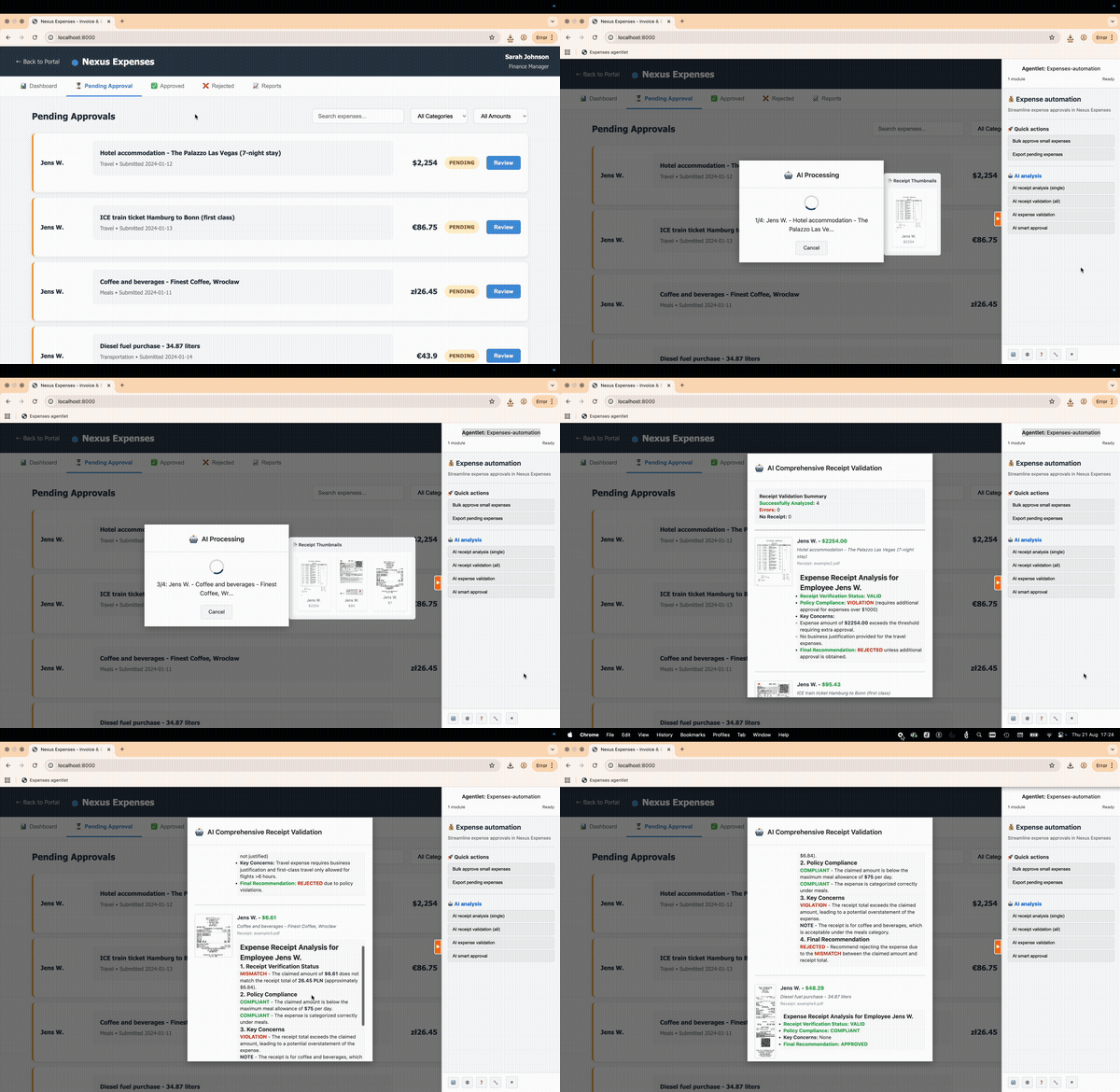
Three ways to deploy
The same core augmentation capabilities, adapted to different technical environments and constraints.
Bookmarklet
A small JavaScript snippet stored as a browser bookmark. Clicking it injects the agentlet into the current page, with no installation required.
Injected at runtime, nothing to install
Extension
An installable extension that launches agentlets with access to browser APIs, persistent state, and automatic injection on chosen sites.
Injected on the sites you choose
Native
The same code the bookmarklet would inject at runtime is instead loaded directly by the host application, for teams who can add a script tag but not change the backend.
Shipped by the host application
What it brings to your application
An expense form filling in automatically: vendor, date, amount and cost center, then the submit button gets a highlighted outline for the user to review, not submitted automatically.
Forms
Extract form structure and fill forms programmatically, with AI-friendly data formats.
Filling triggers the same JavaScript events a real user would, so the host page reacts normally.
The user reviews and submits; agentlet never submits a form on its own.
window.agentlet.forms.fill(form, { '#email': value })A paginated invoice table exporting to Excel: rows highlight, the page counter advances through all three pages, then a file, invoices.xlsx, 42 rows, appears in the panel.
Tables to Excel
Extract table data with optional export to Excel, using SheetJS.
Pagination is supported once you give it the next-button selector, so multi-page tables export in one pass.
window.agentlet.tables.extractAndDownload(table)A bar chart being selected with a dashed rectangle, then a thumbnail of it slides into the panel and an answer types out: March is 18 percent above plan, travel drives most of the gap.
Screenshots
Capture web elements as images with HTML2Canvas, for AI-powered visual analysis.
Capture to a data URL, a blob, a direct download, or straight to the clipboard.
window.agentlet.utils.ScreenCapture.captureAsDataURL()A file, invoice.pdf, drops onto the panel. It lists the extracted vendor, date and amount, then those values flow into the expense form on the page.
AI, text, images, PDF
Direct integration with AI providers, currently OpenAI, with multimodal support for text, images, and PDFs.
PDF pages convert to images automatically before analysis.
window.agentlet.ai.sendPrompt('Summarize this page')An export dialog asking Cost center, with three options. The cursor picks Travel, the dialog closes, and a toast confirms 12 rows exported before fading.
Dialogs and notifications
A unified dialog system for info, input, wait, and progress, plus toast-style message bubbles for status updates.
Both are the building blocks agentlets use to ask the user something or confirm an action completed.
window.agentlet.utils.Dialog.info('Export complete')The panel asks to sign in, with its actions greyed out. Clicking opens a small identity provider popup, labelled id.example.com, which closes on its own, and then a Signed in pill appears as the actions turn active.
Authentication
Optional popup-based authentication for OIDC, OAuth2, SAML, and custom identity providers, with configurable token extraction.
The popup and its origin are validated before any token is accepted; the host page session is untouched.
window.agentlet.auth.startAuthentication()A host page with aggressive red, uppercase, heavy-border buttons. A pulse shows that styling reaching the dashed shadow root boundary around the panel and stopping there: the panel keeps its own clean style.
Shadow DOM isolation
The panel, dialogs, and toasts mount inside an open shadow root by default, isolating their CSS from the host page in both directions.
A host page's resets and global element styles no longer reach into the panel, and the panel's own styles never leak back out.
A code card defines mount, container, context, a real BaseModule lifecycle method. That line highlights, then the panel, empty until then, renders its brand and three actions in, one row at a time.
Mount API
mount(container, context) and unmount(container) give module authors an explicit place to attach a UI framework root, instead of only returning an HTML string.
The default implementation covers plain HTML; overriding it is only needed to host React, Vue, Lit, or a similar framework.
async mount(container, context) { /* attach a UI framework root */ }Guiding principles
- Target specific needs and pages instead of generic, global changes.
- Respect the host application's styles without polluting its CSS.
- Offer opt-in features through a side panel, not automatic changes.
- Assist but do not override: fill forms to save time, never auto-submit.
- Stay lightweight and rely on existing backend APIs for complex logic.
Compared to robots
Agentlets can look like lightweight, local robots, the kind used in RPA (robotic process automation). They are not true bots: they depend on the context of the user's active tab and enhance, rather than replace, the user's interaction.
Scroll for more
| Aspect | Robot | Bookmarklet | Extension | Native |
|---|---|---|---|---|
| Installation | Heavy: desktop and backend | Light: bookmarklet | Light: browser extension | Light: served by host app |
| Autonomy | Fully autonomous | Needs user action | Semi-autonomous | Semi-autonomous |
| Security, scope of action | Full access: OS, files, apps | Sandboxed, browser only | Extended: extension APIs | Sandboxed, inside app |
| Robustness to UI changes | Fragile | Robust with good selectors | Same as bookmarklet | Very robust: tied to app code |
| Performance | Often slow | Instant | Instant | Instant |
| Relies on user context | Yes | Yes | Yes | Yes |
| Interacts with page like a user | Yes | Yes | Yes | Yes |
| Goes beyond current page | Yes | No: single page app only | Yes: across browser tabs | No: single app context |
| Goes beyond browser | Yes: system-wide | No | No | No |
| Interacts with embedded elements | Limited: surface only | Deep: full DOM access | Deep: same, plus APIs | Deep: full access to app DOM |
Get started
Clone the core library and run the built-in demo.
git clone https://github.com/agentlet/agentlet-core.gitcd agentlet-corenpm installnpm run demo